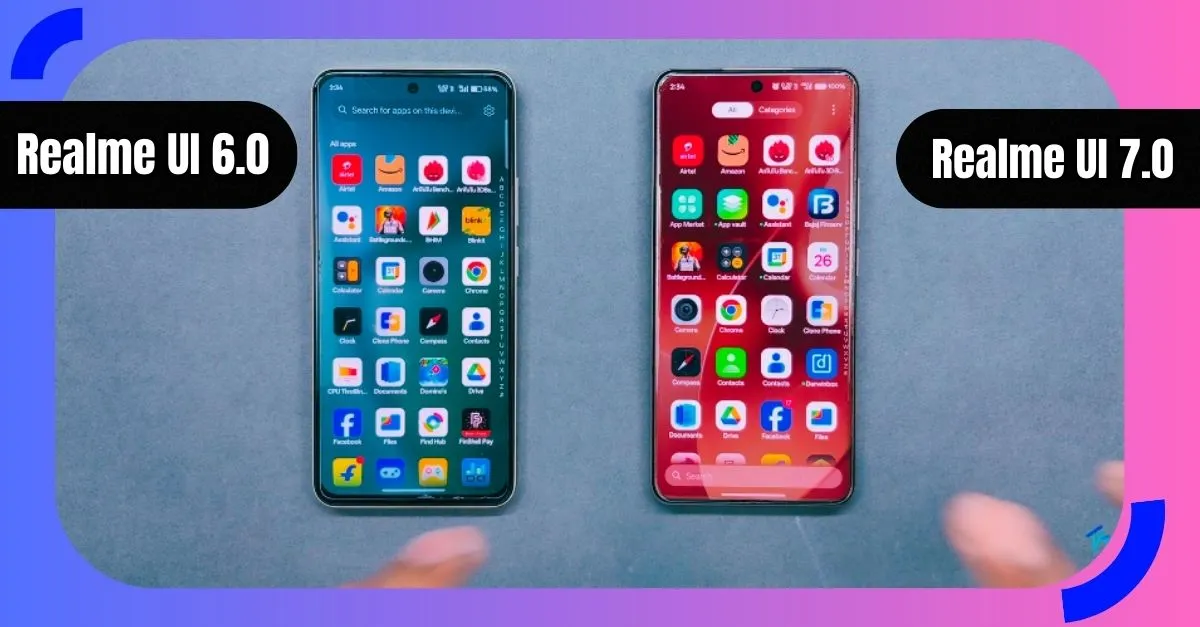
Many people use Realme phones every day and small changes in the system can change how the phone feels. Recently a new Realme UI update started reaching users and many people became curious. They want to learn what is new and how the experience changes compared to the older Realme UI.
This article explains the journey from Realme UI 6.0 to Realme UI 7.0 in very simple words. Everything is shared like a story so even a young reader can understand. No confusing words are used. The goal is to help you explore how the system feels different and what changes you may notice in daily use.
What Is Realme UI and Why It Matters
Realme UI is the system layer that controls how your phone looks and works. It decides how menus appear how smooth actions feel and how easy it is to find settings.
When this system changes users often feel the difference immediately. Even small design updates can make a phone feel new again. That is why many users are talking about Realme UI 7.0 and comparing it with the earlier Realme UI 6.0 experience.
Base System Change and Overall Direction
Android Base Shift
One major background change is the Android base. Realme UI 6.0 was built on Android 15 while Realme UI 7.0 moves forward with Android 16. This shift brings new security rules better system handling and improved privacy structure.
Users may not see this change directly but they can feel it in stability and smoothness during daily use.
Focus on Clean and Modern Look
Realme UI 7.0 follows a cleaner and calmer design direction. Colors feel more controlled and less noisy. The system feels more mature and organized compared to the older interface.
Notification Panel and Quick Settings Changes
New Look and Feel
In Realme UI 6.0 the notification panel looked simple but very basic. Realme UI 7.0 adds more personality. Users can now see multi color tiles and better layout spacing.
The panel feels more alive without becoming confusing.
Custom Color Options
Users can choose how colorful they want the panel to look. Some prefer system colors while others enjoy multi color tiles. This small freedom makes the interface feel personal.
Frosted Glass Effect
One noticeable visual change is the frosted glass style. When enabled the background looks soft and blurred. It feels inspired by modern design trends and gives a premium touch to the panel. Read more Big News Snapdragon 8 Elite Gen 6 Pro Is Coming, Qualcomm’s New 2nm Beast!
Settings Page Experience
Colorful and Clear Sections
Earlier settings used mostly white backgrounds. Now Realme UI 7.0 uses gentle colors to separate sections. This helps users understand where they are inside settings.
Finding options feels easier and more enjoyable.
Combined Home and Lock Screen Area
Home screen lock screen and style options are now grouped together. This saves time and reduces confusion. Earlier users had to move across different sections.
Dark mode appears by default in some parts which makes the screen comfortable for eyes.
Theme and Style Improvements
Flux Theme Support
Realme UI 7.0 adds better theme control through Flux style options. Users can adjust text depth image layers and visual balance.
You can add your name image and control the depth effect easily.
Icon Customization Growth
Icon control has improved. Earlier choices were limited. Now users can adjust icon shape size corner roundness and name style.
This helps users create a phone layout that feels truly theirs.
Home Screen and Lock Screen Changes
Glass Effect Support
Both home screen and lock screen now support frosted glass background. This feature was missing earlier and adds a fresh look.
It makes wallpapers feel deeper and more stylish.
Better Layout Control
Spacing and alignment feel more balanced. Even small actions like long pressing icons give more options now.
App Drawer and Search Experience
Search Bar Position Change
Earlier the search bar stayed at the top. In Realme UI 7.0 it moves to the bottom. This makes it easier to reach with one hand.
Category Based App Sorting
Apps are now grouped into categories like social tools photography games and entertainment. This helps users find apps faster.
This change is especially helpful for users with many apps installed.
AI Related Improvements
Dedicated AI Section
Earlier AI tools were hidden inside accessibility menus. Now Realme UI 7.0 gives AI a dedicated space.
This makes discovery and access easier.
AI Tools Overview
Users can explore AI translation AI camera help and AI gaming coach. These tools aim to assist users during real life usage.
Some tools still need better tuning but the direction looks promising.
Battery Section Enhancements
Clear Power Modes
Battery settings are now easier to understand. Users can quickly switch between power saving and balanced modes.
New Usage Graphs
Two new graphs help users understand battery behavior. This helps people learn how their phone drains power during the day.
Game Experience Changes
Game Assist Instead of Game Space
The gaming area has been redesigned. Game Assist now holds all tools in one place.
The interface looks cleaner and more focused.
Improved Control Layout
Brightness sliders performance modes and quick tools are easier to access. Voice changer options are also expanded.
Gamers can adjust settings without leaving the game.
App Level Visual Changes
Calculator and Recorder Updates
The calculator now uses glass effects and glow touches. It feels modern compared to the older flat design.
The recorder app now supports AI summary which helps users quickly understand recorded content.
Photos App Experience
The gallery keeps a familiar look but adds better gesture support. Swiping up shows image details in a smooth way.
A built in video editor is now available for basic editing needs. This reduces dependency on other apps.
Camera Interface Stability
The camera interface remains mostly unchanged. Controls stay familiar which helps users avoid confusion.
Some improvements are device dependent but the core camera layout stays stable.
Animations and Smoothness
Animations feel slightly more refined in Realme UI 7.0. On higher end phones the smoothness feels more noticeable.
On entry level phones animations may appear simpler but still stable.
Overall Experience and Daily Use Feel
Realme UI 7.0 does not try to shock users with big changes. Instead it improves small areas that matter daily.
The system feels refreshed calm and modern. Users coming from Realme UI 6.0 will notice changes slowly over time rather than instantly.
Community Insight and Public Response
Many users appreciate the cleaner look and better organization. Visual updates like glass effect and icon control are popular.
Some users mention that AI tools still need polishing. This is expected as the system continues to evolve.
Final Thoughts on the UI Journey
Realme UI 7.0 focuses on refinement not revolution. It builds on what worked earlier and improves weak areas.
For users who enjoy clean design smooth flow and better control this update feels like a positive step forward.
Frequently Asked Questions
What is the biggest visual change in Realme UI 7.0
The frosted glass effect and colorful notification panel stand out the most
Is Realme UI 7.0 easier to use
Yes settings and app search feel more organized and simple
Does the update change daily phone usage
Small improvements add comfort and smoother interaction over time
Are AI tools useful right now
Some are helpful while others still need better tuning
Will older phones feel slower
No most phones feel stable though animation depth depends on hardware