
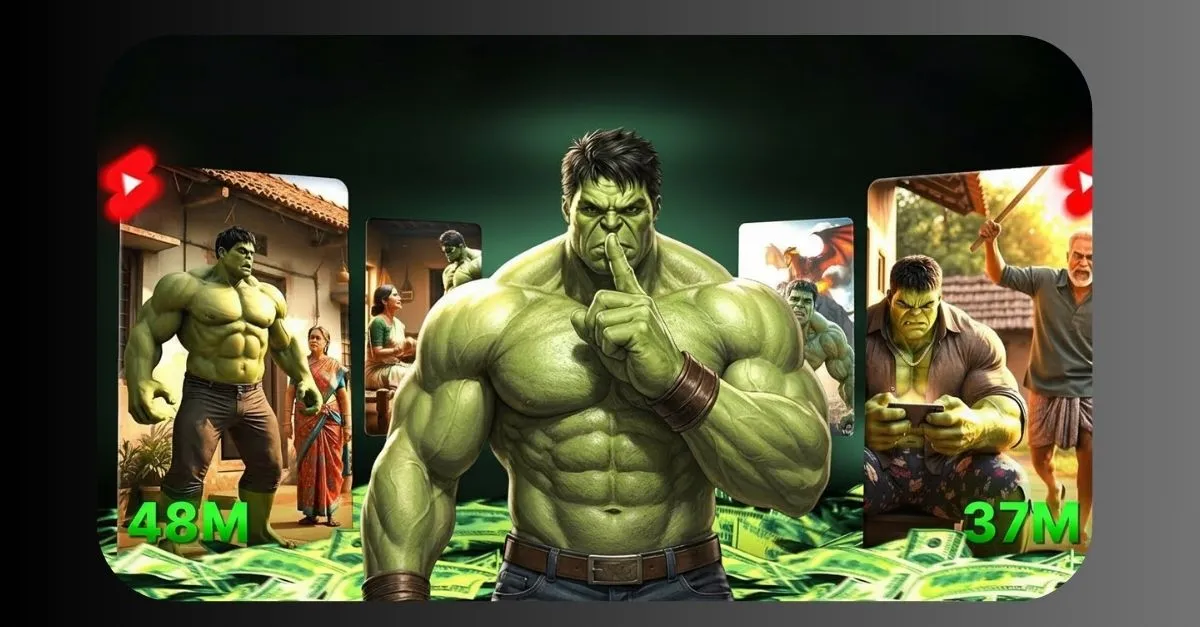
Have you ever scrolled through shorts and seen those fun Hulk stories? You know, the ones where Hulk lives in a simple village, faces family problems, gets angry, and saves the day with his super strength.
These videos mix emotion, action, and a bit of humor. They spread fast because people love watching short tales about a big green hero dealing with everyday issues in a dramatic way. Lately,
many new channels have popped up making these kinds of clips using smart computer tools. One example started just a short time ago and grew super quick with only a few videos,
pulling in millions of views. It shows how fresh ideas like this can catch on big.If you want to try making your own Hulk AI videos,
it is easier than you think. You do not need fancy cameras or drawing skills. Free online helpers can turn simple words into moving pictures and sounds. In this guide,
I will walk you through the steps in a clear way. We will cover coming up with ideas, creating scenes, adding voices, and putting it all together. Let us get started
This guide will help you understand how such viral Hulk AI videos are created. Everything is explained in easy words. No advanced skills are needed. You will learn the full process from idea to final video in a clear and simple way.
Channle Name : Hulk-Bhaiya Ai

Why These Hulk AI Videos Get So Many Views
Short videos about Hulk in family stories are blowing up right now. People enjoy them because they feel relatable. Imagine Hulk as a dad protecting his kids or getting upset over small things, then turning green and fixing everything with power. It adds excitement to normal life tales.
From what I have seen online, channels focusing on these themes gain fans fast. Some get huge numbers of watches in days because the clips are quick, emotional, and fun to share. The secret is keeping stories simple but touching – like poor family struggles, revenge on bad guys,
or happy endings. Adding Indian-style elements, like village settings or moral lessons, makes them even more popular in certain places.The best part? Anyone can jump in. No big team needed. Just a phone or computer and some free tools.
Step 1: Come Up with a Good Story Idea
Everything starts with a story. Good ones last about 30 to 60 seconds, so keep it short.Think of something like this: Hulk lives in a small house with his parents. They are poor. One day, bad people take his dad away. Hulk gets mad, turns green, fights them, and brings his dad home safe.
Everyone is happy.To get ideas flowing, use a free chat tool like ChatGPT. It is an app you can download or use online. Tell it what you want.For example, say: Give me a short story about Hulk in a poor family.
His dad gets kidnapped. Hulk saves him with fights. Make it exciting but end happy. Keep it for a 30-second video.The tool will write a nice script for you. You can change it to fit better.
Make sure the story has a start, problem, big action, and end. This keeps viewers watching till the finish.Short tip: Focus on feelings. People love when Hulk shows love for family or gets really angry for a good reason. FINALLY BGMI 4.2 Update Official Release Date, Primewood Genesis New Theme Mode Full Details, wow! movements for BGMI Fans
Step 2: Turn Your Story into Scene Prompts
Once you have the script, break it into small parts. Each part becomes one short clip.Ask the chat tool again: Take this story and make detailed prompts for video scenes. One prompt
per scene, like scene 1, scene 2.A prompt is just a clear description. For example: A poor small house in a village. Hulk, a big green man, sits with his old parents. They look sad but
loving. Sunny day outside.Good prompts help the video tool make realistic pictures. Describe actions, feelings, and looks. Like: Hulk’s eyes fill with anger. He turns greener and bigger. Muscles grow.You might get 6 to 10 scenes for one video. That is perfect for shorts.
Step 3: Create the Video Clips with Free AI Tools
Now the fun part – making moving pictures from words.One easy tool many use is called something like Flo AI or Flow AI. It is a website where you paste your prompt and it makes a short video clip.
You can do several at once.Go to the site, sign up if needed (often free to start), choose text to video, paste one prompt, and wait. It generates a clip with animation.Other free options include:
- Vidnoz AI – Good for turning pictures or words into animations.
- Pollo AI or similar – They have effects for big muscle changes like Hulk turning angry.
- Krikey AI – Great for cartoon styles.
These tools make clips that look real or cartoonish. For Hulk style, describe him as a massive green hero with ripped clothes.Download each clip after it finishes. Make one for every scene.If a clip does not look right, try the prompt again with more details.
Step 4: Add a Voice That Tells the Story
Videos need sound to feel complete. A clear voice reading the story makes it better.Look for free text-to-speech sites. Search for ones that support Hindi or English voices that sound natural.
Paste your full script into the box. Pick a strong male voice – maybe one that sounds energetic or emotional.Some sites let you choose feelings, like angry for fight parts or happy for the end.
Download the audio file. It will match your story length.Tip: Test a few voices. Pick one that fits Hulk’s tough but caring side.
Step 5: Put Everything Together in an Editing App
You have clips and voice now. Time to combine them.Use a free app like CapCut or VN on your phone. They are simple.Start a new project. Add your video clips in order.Then add the voice audio on top.
Adjust so words match the actions – like when the voice says “Hulk gets angry,” show him changing.Mute any sounds from the clips if needed. Add soft background music if you want,
but keep it low.Trim clips to fit perfectly. Make the whole video 30 to 60 seconds.Watch it a few times. Fix timing so it flows smooth.When happy, export the final video.
Extra Tips to Make Your Videos Stand Out
Keep Hulk looking the same in every clip. Use similar descriptions in prompts.Stories with family love or justice do well. Add small funny moments, like Hulk tripping before
getting strong.Post on shorts platforms. Use titles like “Hulk Saves His Dad – Emotional Story” to grab attention.Try different ideas.
One about Hulk helping poor kids or facing bullies.Practice a few times. Your videos will get better quick.Safety note: Use tools responsibly. Make original stories.
Common Questions About Making Hulk AI Videos
What if I am new to this? Can I still make good videos?
Yes. Start simple. Follow the steps. Your first one might not be perfect, but you learn fast. Many started the same way.
Are these tools really free?
Many have free parts to try. Some give daily limits. Check each site. Enough for starting.
How long does one video take?
About 30 minutes to an hour once you get the hang. Story and prompts quick, generating clips takes waiting time.
Can I make videos in Hindi?
Yes. Use Hindi scripts. Choose Hindi voices in speech tools. Prompts can be in English for better pictures, but story in your language.
Why do these videos go viral sometimes?
They touch hearts. Short, exciting, and shareable. Good timing and consistent posts help too.There you go. Now you know how to create your own Hulk AI videos from home.
It is a fun way to tell stories. Give it a try and see what you come up with. Who knows, your clip might be the next one everyone watches. Have fun creating.










Leptop