Discover Z-Image: A simple idea in your head into a beautiful picture in just seconds. No fancy tools needed, just your words. That’s the magic of Z-Image, a new AI helper from Alibaba’s smart team.
It creates realistic photos, fun drawings, and even posters that look real. If you love drawing but want something quicker, this could be your new best friend. Let’s explore how it works and why it’s exciting.
What Makes Z-Image Special?
Z-Image is like a tiny artist in your computer. It has only six billion building blocks, which means it runs fast even on regular setups. Think of it as a speedy bike instead of a big truck. The main version,
called Z-Image-Turbo, whips up images super quick. You can make a cozy room scene or a wild adventure in under ten seconds.From what folks online share, it shines at understanding the world. It knows famous places like the Great Wall or stars like soccer players. One test showed
it drawing Anne Hathaway, Jackie Chan, and Messi at a party spot. The faces looked just right, with natural hands and smiles. Other tools sometimes mix up details,
but Z-Image keeps things spot on.It also handles words well. Want a poster with curly letters saying “Fresh Baked Today”? It gets the font and lists like croissant prices without mess-ups. This helps for school projects or quick signs.
How Z-Image Stacks Up to Others
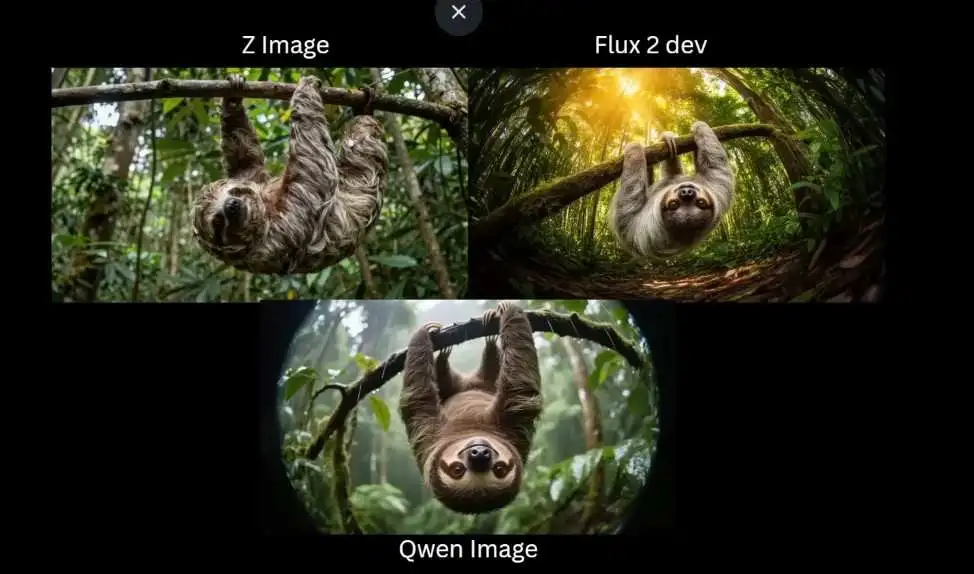
People test Z-Image against tools like Flux or Qwen. In one fun challenge, it drew anime friends taking a selfie. Hatsune Miku’s hair flowed perfectly, and Nezuko’s outfit matched her story.
Flux got some parts wrong, like twisted fingers, while Qwen blurred the looks. Z-Image won for keeping characters true.For tricky spots, like a woman doing a handstand with one bent leg,
Z-Image nailed the bend and toes pointing out. Others flipped feet backward. Even in busy markets full of stalls and crowds, it keeps people clear without fuzzy edges.Art styles?
It paints a tiger in misty Chinese brush strokes, soft and wild like real ink. Flux looked too shiny, Qwen added extra bits that didn’t fit. Z-Image feels alive, with grainy photo vibes that trick your eyes. Read more Top 7 Crazy AI Apps You Must Try Best Android Apps
Easy Steps to Start Creating with Z-Image
Getting going is simple, like following a recipe. First, head to the free spot on Hugging Face. Type a note like “a sloth hanging in a rainy forest through a fish-eye lens.”
Pick size, hit go, and watch it build. You get a few tries each day without signing up.For more fun at home, use ComfyUI, a free setup for AI play. Download the files from the official spot, about eleven gigabytes for the main one. Drag a ready map into the screen, pick your models, and type your idea.
Tweak steps for sharpness, eight to ten works best. It saves pictures right away.Short on power? Grab a squeezed version under four gigabytes. It still makes sharp scenes, like a bakery window
with exact prices and pastries that look yummy.Want to tweak old pictures? Feed one in and describe changes, like turning summer green to winter snow. It keeps the main bits while adding fresh touches.
Ideas to Spark Your Imagination
Try wildlife snaps, a rabbit on a piano watching a dancer spin. Or character sheets for stories, showing a hero from front, side, and back with the same white hair and red sword.
For holidays, craft a cookie jar poster with curved words and sponsor spots.Z-Image loves poses too. A cafe selfie with a wink and peace sign? It catches the fun angle,
like a real phone snap. Add extras like glowing effects or pixel art styles for games. github
What the Community Says
Online chats buzz with shares. Artists post lion-headed dancers or minimalist rooms that glow. One said, “It’s wild how it fits low gear setups.” Tutorials pop up for blending
with other tools, like fixing fuzzy edges. Hashtags like ZImageTurbo fill feeds with dreamy art. Since its launch last month, downloads hit half a million, showing quick love.Trends
show spikes in searches for fast AI pictures, tying right to Z-Image’s speed. Folks mix it with videos for dancing scenes, proving it’s a playground for ideas.Z-Image opens
doors to create without limits. Whether for fun or learning, it turns thoughts into sights that wow. Give it a whirl and see your world bloom.
FAQ
What is Z-Image good for creating?
It excels at realistic photos, posters with text, character drawings, and art in styles like watercolor. Great for scenes with people, animals, or places.
How fast does Z-Image work?
Most images appear in five to ten seconds on a decent setup. The Turbo part makes it zippy for quick ideas.
Can I use Z-Image on my laptop?
Yes, squeezed files run on four gigabytes or more. Start with the online demo to test without downloads.
Does Z-Image understand story characters?
It does. Prompts with names like Snow White or anime heroes come out looking true to their tales.
Where can I find more tips on Z-Image?
Check community shares or official guides for workflows and prompt tricks to boost your results.